
FairSpin Login and Account Access in Canada
The FairSpin login sits in the top-right corner of the header, and selecting it opens a small modal over the lobby: an email field, a password field, and underneath them the line Or log in with: followed by MetaMask, Apple, Google and Telegram. A Forgot Password? link waits at the bottom. That is the whole surface, and the screenshot below is the real form on a Canadian connection.
Most sign-in trouble comes down to the wrong route into an account that already exists, or a phone keyboard that helpfully capitalised a password. Both are easy to undo.
Open your FairSpin account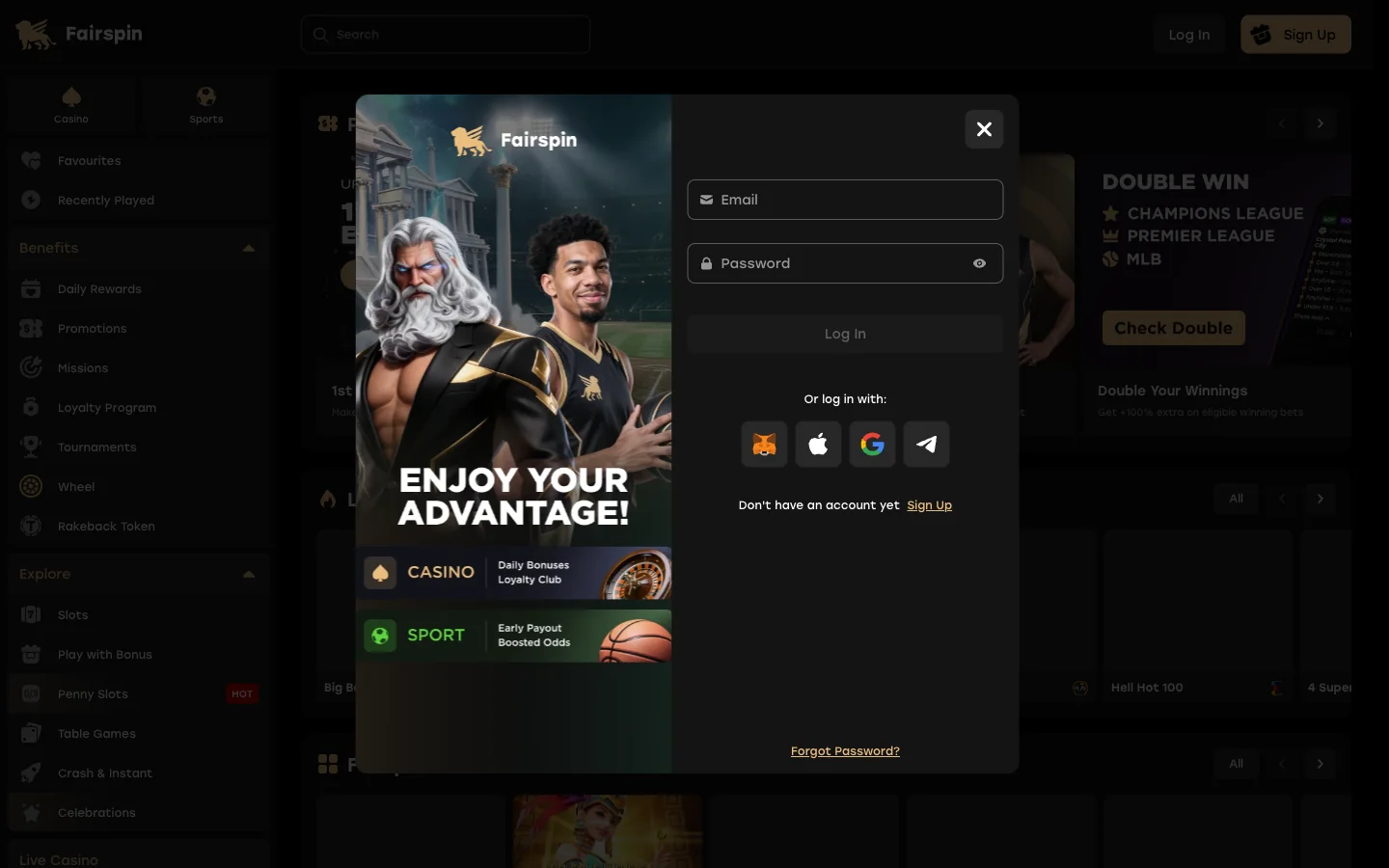
How to Log In to FairSpin Step by Step
- Load the FairSpin site you normally use and look to the top-right corner of the header, where Log In sits beside the sign-up button.
- Select Log In. The form opens as a modal over the lobby, so the page you were reading stays put.
- Enter the email the account was created with. A second address of yours, however similar, will not find it.
- Enter your password. It is case sensitive — paste rather than retype, and switch off autocapitalisation on a phone.
- Or skip the password and pick MetaMask, Apple, Google or Telegram under Or log in with, provided the account was opened that way.
- Check the header. Your balance should show in CAD. No balance means you are still browsing as a guest.
No account yet? The registration modal is the same component plus an I Have a Promo Code button and an 18+ and terms checkbox. Minimum deposit is $20 CAD; the welcome maths lives on our bonus page.
FairSpin Casino Login With Google, Apple, Telegram or MetaMask
Four alternative routes sit under the password fields, and competitors covering this topic barely mention them. Google and Apple sign you in through an account you already hold, and Telegram authorises through the messenger. MetaMask is the interesting one: approve a signature in the wallet and you are in, no password stored anywhere — a genuine Web3 feature of this brand, consistent with its TFS rakeback token and Web3 Originals section.
Here is the part almost nobody writes down, and it explains a large share of "my FairSpin login stopped working" reports. Sign in by the same route you registered with. In most casino back-ends, an account created through Google on [email protected] and an email-and-password account on that identical address are two separate records. The password form will not open the Google-created one.
- Registered with email? Use the email and password fields, and reset the password if you must.
- Registered with Google or Apple? Use that button every time. There is no password to recover, because none was ever set.
- Registered with Telegram? Keep access to the same Telegram account; losing the number is the real risk here.
- Registered with MetaMask? The wallet is the key. A new wallet address is a new identity, and seed-phrase backup matters more than any password hygiene.
If you genuinely cannot recall which route you used, live chat can check which method is attached to your email faster than you can guess at it.
Resetting a Forgotten FairSpin Password
The Forgot Password? link at the foot of the login modal is the only route worth using. It asks for your account email and sends a reset message there, which is why a current, reachable address matters more at a casino than at a site you never withdraw money from.
Nothing arriving? Work through this first:
- Check junk, spam and the promotions tab — casino mail lands there constantly.
- Wait a few minutes, then request once more. Five requests can invalidate the earlier links.
- Confirm you typed the registration address, not a newer one you have since moved to.
- If the account was opened through Google, Apple, Telegram or MetaMask, no reset mail will ever come — there is no password on it to reset.
Still silent, write to [email protected] from the registered address or open the 24/7 live chat. Public complaint boards put the operator's typical first response at around a day.
FairSpin Login Errors and What Each One Means
Error wording changes between releases, so match the sense rather than the exact string.
| What you see | What it usually means | What to do |
|---|---|---|
| Incorrect email or password | A typo, caps lock, or the right address on the wrong sign-in route | Paste the password, check the keyboard, then try the social button you may have registered with |
| Account not found | The address was never registered, or registration was abandoned at the checkbox | Try an older address of yours; if none works, register fresh |
| Too many attempts, try later | A temporary rate limit after repeated failures — not a ban | Stop guessing, wait, then reset the password instead of attempt number nine |
| Session expired mid-play | Normal session timeout, or your connection changed networks mid-spin | Sign in again; a spin already resolved stays resolved and the balance follows |
| Page or modal will not load | Script blocking, a stale cache, or a mirror domain that is misbehaving | Reload, clear the site cache, pause extensions, then try the installed app |
| Verification required before cashout | You are signed in fine — the block is on withdrawal, not access | Send the documents requested; see our payouts page |
| Account closed or restricted | A closure, a compliance hold, or a self-exclusion you set | Ask support which of the three it is before anything else |
FairSpin Accounts: Locked, Closed or Self-Excluded
Three different situations produce a similar-looking refusal, and treating them as one thing wastes days.
- Temporarily locked. Usually automated — too many failed attempts, or a review in progress. It lifts, often on its own.
- Closed. Either you asked for closure or the operator closed it. Support can say which, and whether reopening is possible at all.
- Self-excluded. You chose a break and the system is doing exactly what you told it to.
On that last one, plainly: this site will not help anyone work around a self-exclusion. The protection only works if it holds while you want it gone. If the break feels wrong, talk it through with the free provincial services on our responsible gambling page, not with a retention team.
Logging In Is Not the Same as FairSpin Verification
You can open an account, deposit, take the 200% welcome offer and play for weeks without uploading a document. Identity checks at FairSpin attach to the first withdrawal, not to access — standard practice, and the single most common misunderstanding behind angry posts about login problems that turn out to be payout problems.
My advice, for what it is worth: send the documents when you open the account, not when you are waiting on money. KYC friction on larger payouts is a recurring theme on public complaint boards for this brand, and an approved file removes it. Details sit on our withdrawal times page.
Staying Signed In to FairSpin Safely
A casino session dropping is not a fault. Gambling sites run short sessions on purpose, and a tab left open all afternoon will be signed out when you return to it.
- Never tick "remember me" on a shared or family computer. A logged-in casino tab is a funded wallet left open on a desk.
- Use a unique password. Reused credentials from an old breach are how casino accounts actually get taken, not clever hacking.
- Keep your account email current and secured — it is the reset and recovery channel, so add two-factor protection to the mailbox itself.
- Prefer Apple, Google or MetaMask if you would rather not hold another password at all.
- Log out on public Wi-Fi at the library or the airport, every time, before you close the lid.
The licence obliges FairSpin to offer self-exclusion and deposit limits, and those settings live behind this same login. Setting a deposit cap while you are calm is easier than setting one later.
FairSpin Mobile Login and the Installed App
On a phone the Log In control hides inside the menu icon, and the modal is the same with larger fields. Install the site to your home screen and the login survives between launches like any app, because it is a progressive web app sharing one account with the browser — install steps are on our FairSpin app page.
Check the FairSpin Domain Before You Type a Password
One calm, factual note. The brand runs several domains, and the address Canadian players land on is not always the one printed on the register: the Anjouan entry for licence ALSI-202508047-FI2, held by Sorta Group Limitada, lists fairspin.io as the registered website, while the mirror in front of most players carries a different name. No wrongdoing is alleged — mirrors are routine here. It does make one habit worth keeping: read the address bar before entering credentials, because lookalike domains are a real nuisance around popular casino brands. What the licence covers sits on our FairSpin review page.
Your FairSpin Account Takes About a Minute
Email and a password, or one tap through Google, Apple, Telegram or MetaMask. Then the lobby — Pragmatic Play, Hacksaw, Nolimit City, Evolution live tables and the Fairspin Originals games.
See the FairSpin lobbyFairSpin Login Questions
Top right of the header on desktop, next to the sign-up button. On a phone it sits inside the menu icon, and the form opens as a modal over the lobby.
Yes. Google is one of four alternatives under the password fields, together with Apple, Telegram and MetaMask. Use it only if the account was created through Google.
It does. MetaMask appears in the login modal and signs you in by wallet signature instead of a password, which fits the Web3 side of this brand.
Use the Forgot Password link at the bottom of the login modal, enter your account email, then follow the reset message. Check junk and promotions folders.
Casino sessions expire by design, and switching networks or leaving a tab idle can end one early. Signing back in returns you to the same balance.
No. Identity documents are requested before a first withdrawal, not before signing in. Our payouts page covers what the operator asks for.
A self-exclusion runs for the period you chose and this site will not help anyone shorten it. Support can explain the terms you agreed to.
No. The installed FairSpin app is a progressive web app, so it shares the same account and the same login form as the browser.